7.2.2. SentinelOne Telemetry Integration
Cyber Triage can import previously recorded telemetry data from SentinelOne. See Add EDR Telemetry Data for how to import the data once a profile is configured.
7.2.2.1. Configure SentinelOne API Access
7.2.2.1.1. Create a SentinelOne Service User
To access the data via the API, you need a dedicated SentinelOne Service User with an API key.
- Create a new User Role in SentinelOne to define what permissions the Cyber Triage Service User will have. The minimum set of permissions needed is:
Endpoints.View
Endpoint Threats.View
STAR Rule Alerts.View
SDL Search.View
SDL API Keys.View
Create a new Service User and apply the new Role so it has the correct permissions.
You can also define which SentinelOne Account and Sites the Service User has access to. Cyber Triage supports multiple SentinelOne profiles, so you can create multiple Service Users (scoped to different Accounts/Sites) if needed.
Record the API key when it’s generated - you will not be able to retrieve it again once you leave the API key dialog.
7.2.2.1.2. Add API Credentials into Cyber Triage
Go to the options panel and choose “Integrations / SentinelOne”. You’ll see a list of existing profiles (you can have more than one).
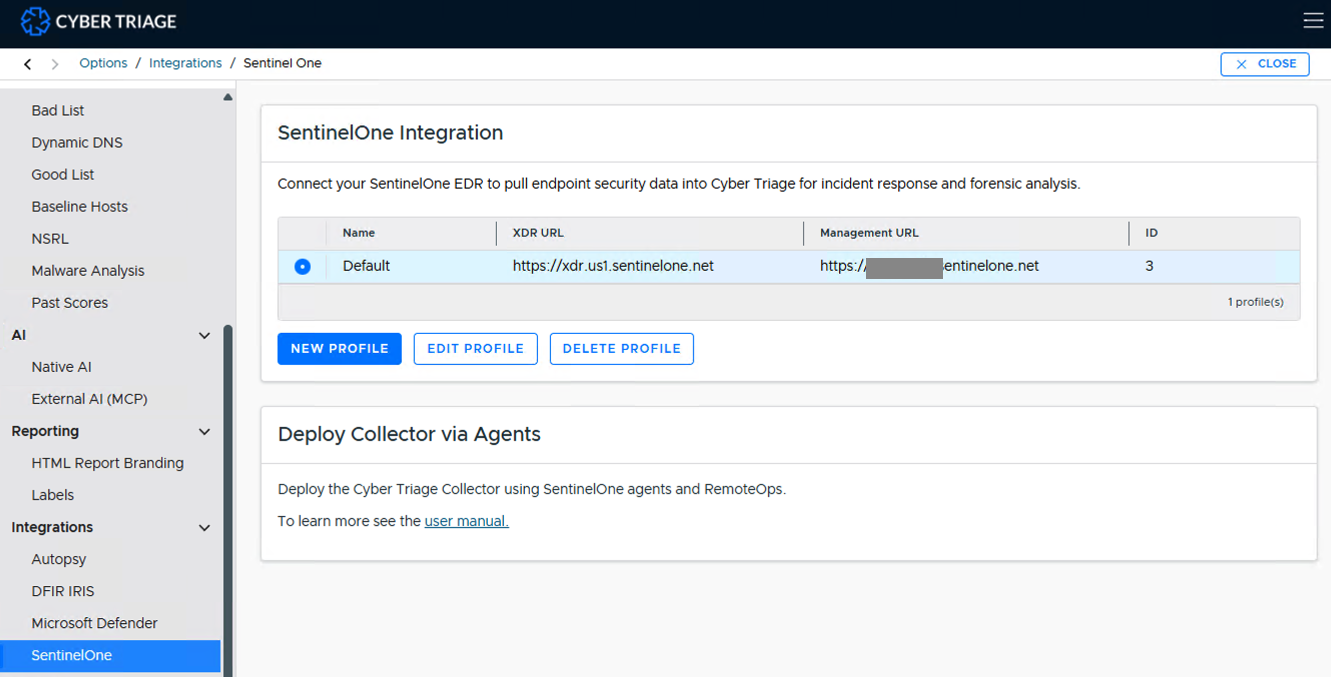
SentinelOne Integration profile list
Press New Profile (or Edit Profile on an existing one) and enter:
Profile Name: A display name to help you manage this profile’s settings.
XDR URL (Data Lake): The XDR data lake region for your deployment. Choose “Custom…” to enter an on-premises or unlisted URL.
Management URL: The SentinelOne management console URL you use to log in (e.g. https://usea1-xxxx.sentinelone.net).
API Key: the key you recorded from the Service User above.
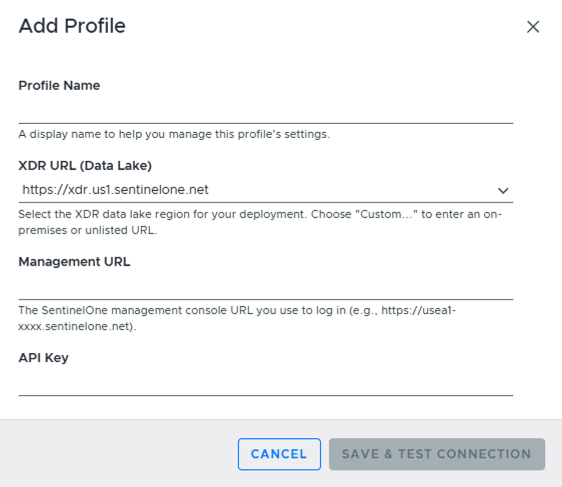
Add Profile
Press Save & Test Connection to verify Cyber Triage can talk to the server.
This same options page also has a Deploy Collector via Agents section for deploying the Collector using SentinelOne agents and RemoteOps - see SentinelOne-based Collections.