7.4.1. Cloud Functions
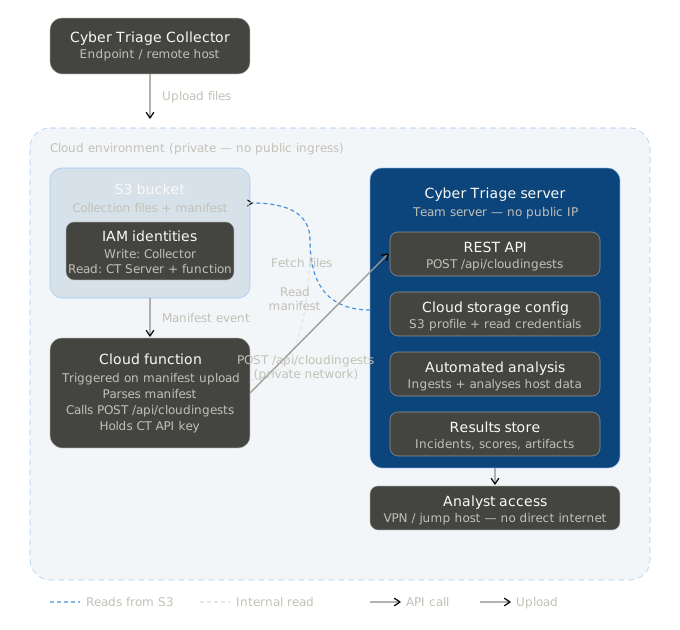
Cloud functions (such as AWS Lambdas, Azure Functions, and Google Cloud Functions) can be used to automate tasks in cloud environments. You can use them with Cyber Triage to start ingesting data as soon as data is uploaded to cloud storage, such as S3 or Azure blobs.
7.4.1.1. Requirements
Team Enterprise license of Cyber Triage
Team Server running in a cloud environment
Cloud object storage configured for uploading from the Collector.
7.4.1.2. Basic Setup
Setup Cyber Triage Server in a cloud environment. It should NOT be public facing. See Team Installation and Configuration.
Create a bucket and identities for uploading and reading the data. Configure Cyber Triage to be able to read from this bucket. See Configuring Cloud Storage Services.
- Create a cloud function (or use a template from us) that will:
Detect when the manifest file is uploaded to the bucket. It will need bucket permissions.
Parses the manifest file to confirm a successful upload and identifies the first uploaded JSON file.
Pass the path of the JSON file into the Cyber Triage API. It will need the Cyber Triage API key. See the Cloud Ingest API for details.
Contact Support if you’d like a AWS Lambda template and more specific instructions.