2.2.1. Architecture
There are three components of a Cyber Triage® Team deployment:
Cyber Triage® Server: Where the processing and analysis occurs. This also contains the REST API (Enterprise-tier) used by other integrations.
Cyber Triage® Clients: Users can either run an installed application on their computer or log into a the server using a web application.
Database: Where the collected data is stored. This can be on the same host as the Cyber Triage Server or on a different one.
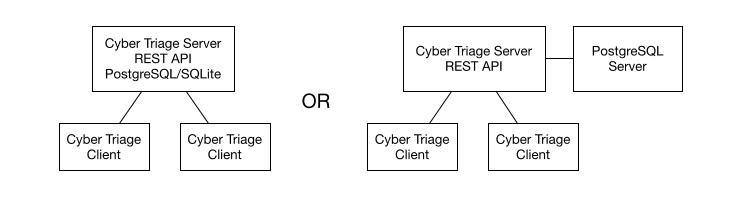
Cyber Triage® Team cluster
2.2.1.1. Web Browser vs Installed Clients
Users can connect to the server using either a web browser or an installed client application.
There are two main benefits to using the installed client: * MCP: It provides the MCP server in a Team environment. Your AI client can be configured to launch a command that comes with the installed client. * Local Processing: It allows you to locally process disk images, memory images, local drives, and logical files. With a web browser, you can upload more limited types of data OR the server needs to have access to the data.
To install the client, see Install and Configure Cyber Triage Clients.
2.2.1.2. Network Requirements
All three components of a Cyber Triage Team deployment — Server, Clients, and Database — must be on the same private network.
The Cyber Triage Server and Database must not be on a public-facing address.
If running in a cloud environment, all components must be within the same Virtual Private Cloud (VPC) and the same region.
If you have multiple Cyber Triage Server licenses, each Server needs its own dedicated Database server.
See Listening Ports for the specific firewall ports the Server needs open.
2.2.1.3. Deciding on Cloud vs On-Premise
If you have the option of using both on-premise or cloud, here are our guidelines:
We recommend that Clients and the Server should be on the same network and region. Either all on-premise or all in the cloud. Hybrid setups can work if you have a high performance VPN.
- The Team Server should not be public facing. So, it will only be able to receive direct connections from suspect hosts on the same network (cloud or on-premise). If you want to collect using direct connection methods, you should pick a location based on where the most direct connections will happen.
Example direct connection methods are Network - PsExec and Launch via PowerShell, WMI, etc..
To get data from suspect hosts on different networks, you will need to use cloud-based storage (see Cloud Storage) or similar methods to temporarily store the data.
We do not recommend the cloud-native PostgreSQL databases. We recommend you run PostgreSQL on the same server as the Cyber Triage Server.
Otherwise, if all of the above recommendations can be met with both cloud and on-premise, it’s purely a financial and policy decision.
2.2.1.4. Database Options
Each Cyber Triage Server will need its own database and there are three options to choose from:
PostgreSQL on the same host as the server: Recommended. You will have a single computer with both the Cyber Triage Server and PostgreSQL on it. This setup minimizes the number of hosts to maintain and can be more secure because PostgreSQL access can be restricted to the local host.
PostgreSQL on a different host: If your server does not have enough resources, you can set up a dedicated PostgreSQL server or a managed PostgreSQL service from a cloud provider. The server can be Windows or Linux. This setup has additional network configuration complexities.
SQLite: The server can use local SQLite databases. This is the easiest to configure, but has the worst performance. We recommend this only for basic evaluation purposes.
We recommend that you start your production environment with PostgreSQL on the same host as the Cyber Triage Server. If you do not get the needed performance, then use a dedicated host for the database.
Warning
There is NO data migration path between SQLite and PostgreSQL.
If you are going to run Cyber Triage in a cloud VPC, then you can refer to blog posts that we did where we tested various managed PostgreSQL services. For example, here is the post about AWS.