3.3.7. SentinelOne Telemetry
3.3.7.1. What is it
You can import data that was previously recorded by SentinelOne.
Note
This feature requires an Enterprise-tier license.
3.3.7.2. How to Get The Data
To import directly via API, you must first configure a profile. See Configure SentinelOne API Access.
3.3.7.3. How to Import
To add SentinelOne data, choose Add New Host from the Incident Overview and choose the SentinelOne box.
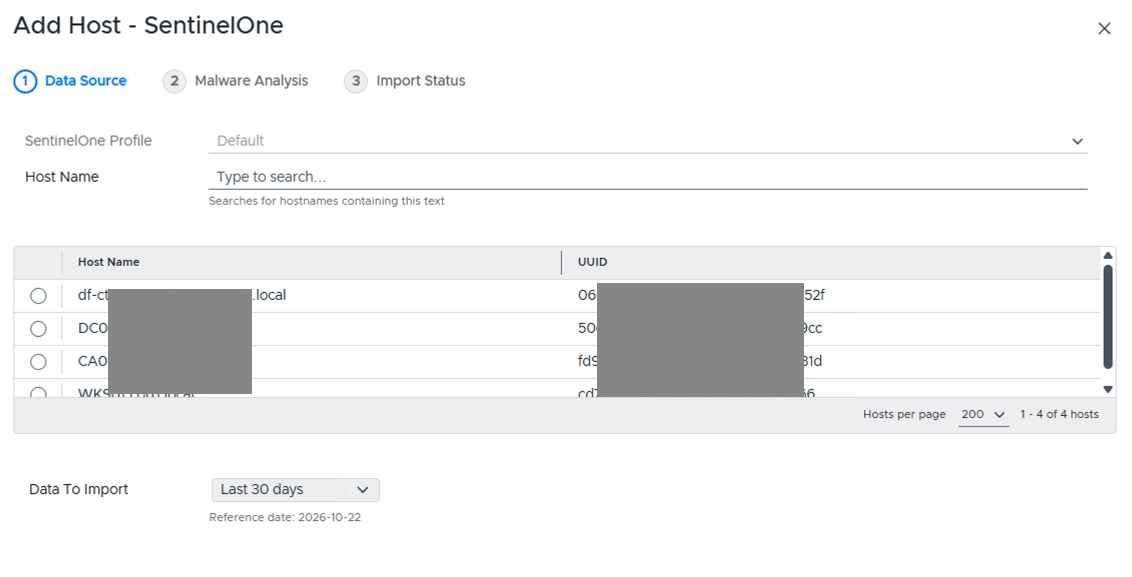
Add Host - SentinelOne
Pick the SentinelOne Profile, then type in the Host Name field to search for and select the hosts you want (matches hostnames containing the text you type).
Choose how much data to import from the Data To Import dropdown (defaults to Last 30 days).
Update the display name and reference date as needed.
Press Continue to then configure automated analysis settings (see Ingest-Time Settings).